The Individual Certificate of Rating (ICOR) is your individual NASH certificate. For FY 2025 Batch 2, DepEd Memorandum No. 044, s. 2026 made it available “through the DepEd LMS using the same account registered during the assessment” (para. 7). Log in at lms.deped.gov.ph, set your Current Position in your profile, open the NASH Batch 2 course, click Certificate of Rating, then View certificate. The link stays hidden until the assessment activity is marked complete and your NASH Examinee Number (Batch 2) is in your profile.
Your scores decide your competency level. DepEd scores each domain and your overall result on a 1 to 100 scale, and a score of 65 or higher overall and in at least three domains makes you a prospective candidate for School Principal I, subject to the qualification standards and DepEd’s hiring guidelines (DM 044, s. 2026, para. 5).
Key findings
- One certificate, three names. DepEd Memorandum No. 069, s. 2025 planned “Certificates of Rating (COR)” by email; Batch 1 got an “Individual Certificate of Rating (ICR)” in the LMS; Batch 2 got the ICOR, also in the LMS (DM 069, s. 2025, para. 12; DM 097, s. 2025, para. 8; DM 044, s. 2026, para. 7).
- Set your position first. “To ensure the correct position title is reflected in the ICOR”, update the position field from the dropdown; “Other profile details cannot be edited, as these are based on official data from the regions” (DM 044, s. 2026, para. 7).
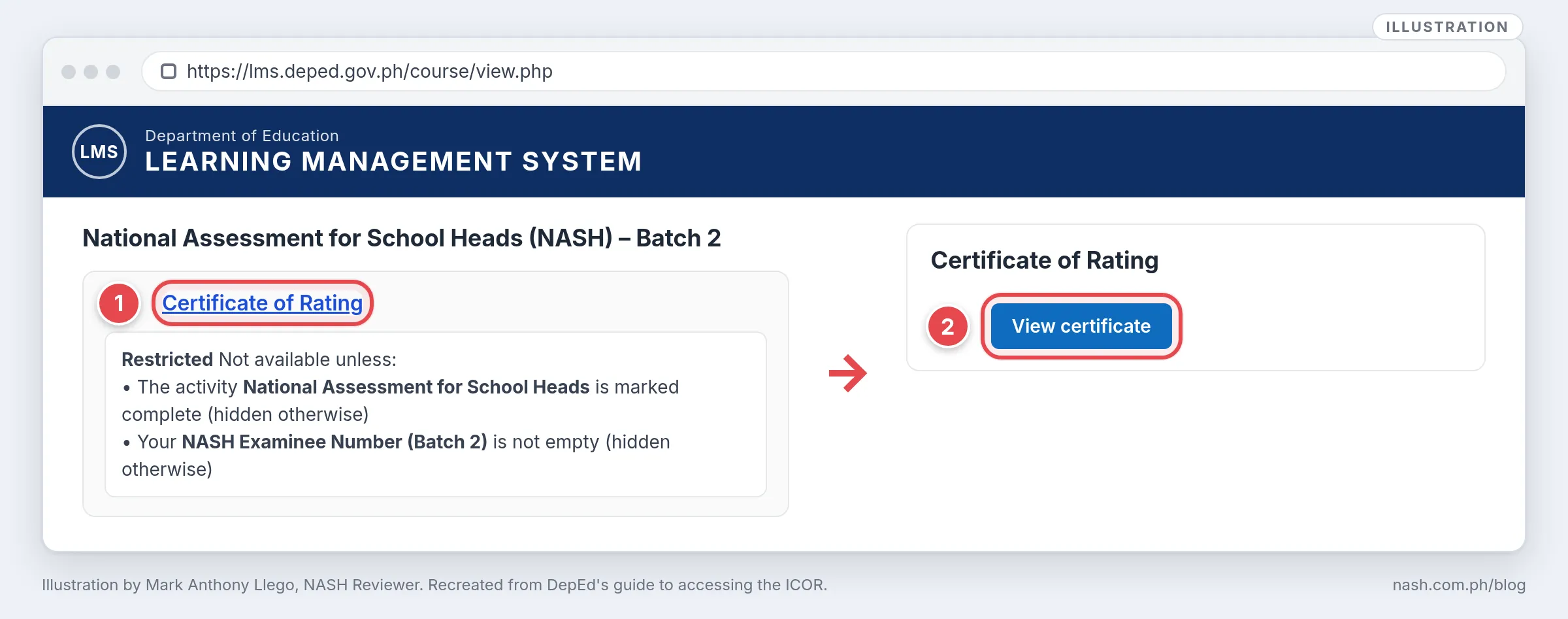
- Two conditions unlock the link. “The activity National Assessment for School Heads is marked complete” and “Your NASH Examinee Number (Batch 2) is not empty” (ICOR access guide, step 6).
- Corrections go through a form. “If corrections are needed, concerned participants are requested to accomplish the online form via this link: https://tinyurl.com/NASHB2-concerns” (DM 044, s. 2026, para. 7).
- 65 is the line. The levels are Meeting PPSSH standards in four domains, in three domains, and With Developmental Areas, decided by the overall score and the domain scores against 65 (DM 044, s. 2026, para. 5).
One certificate, three names
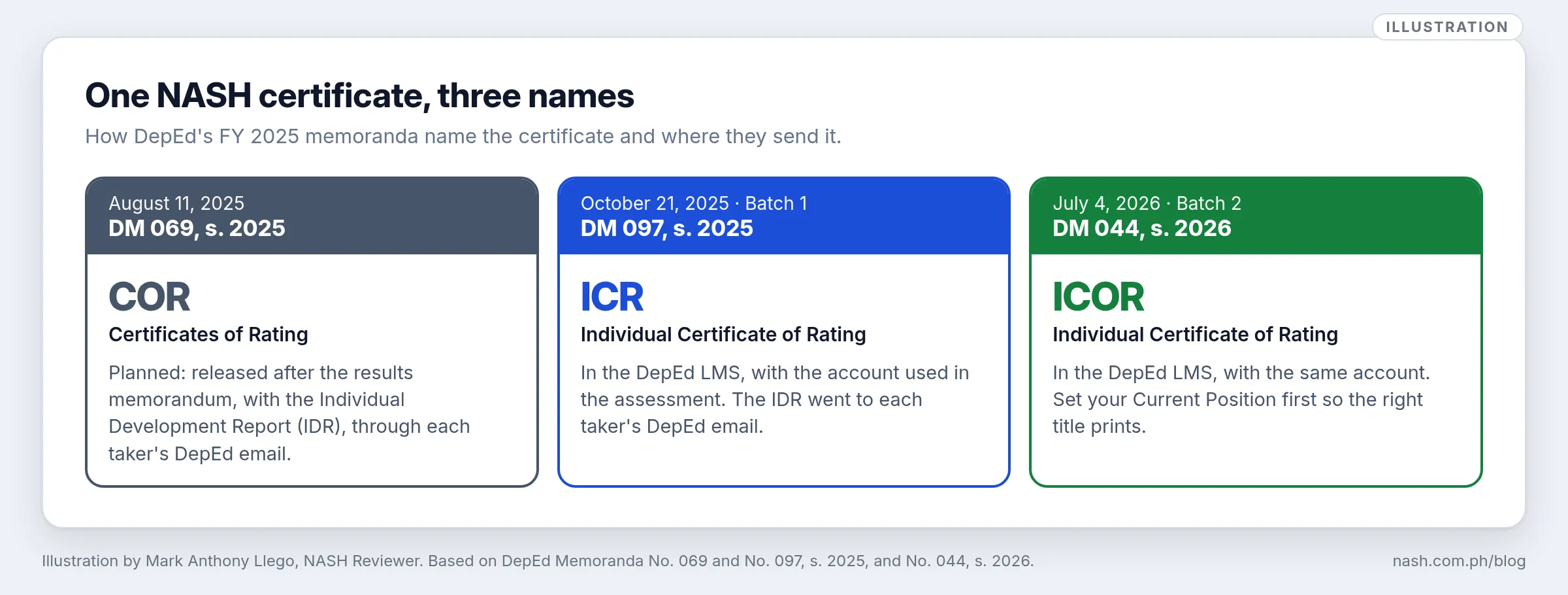
| Memorandum | Name used | Where it went |
|---|---|---|
| DM 069, s. 2025, August 11, 2025 | “Certificates of Rating (COR)” | With the Individual Development Report (IDR), “through the DepEd Official Email address of the takers” (para. 12) |
| DM 097, s. 2025, October 21, 2025 (Batch 1) | “Individual Certificate of Rating (ICR)” | “through the DepEd-LMS using the account they registered with during the assessment” (para. 8); the IDR by DepEd email (para. 9) |
| DM 044, s. 2026, July 4, 2026 (Batch 2) | “Individual Certificate of Rating (ICOR)” | “through the DepEd LMS using the same account registered during the assessment” (para. 7) |
The IDR is a separate document. DM 097 describes it as “a summary of the taker’s strengths, areas for improvement, and recommended developmental interventions” (para. 9). DM 044, s. 2026 does not mention the IDR for Batch 2, though DM 069, s. 2025 provides one by DepEd email for every FY 2025 taker (para. 12). If you have none, check your official DepEd email, then write to bhrod.hrdd@deped.gov.ph (DM 044, s. 2026, para. 9).
How to download your ICOR
DepEd’s guide to accessing the ICOR gives seven steps:
- Open the DepEd LMS at https://lms.deped.gov.ph.
- Log in to the LMS account “that you used during the NASH – Batch 2”.
- Go to your profile and click Edit profile.
- Under Demographics, select your Current Position.
- Click Update profile.
- Go back to your dashboard, open the NASH Batch 2 course, and click Certificate of Rating.
- Click View certificate to download your ICOR.
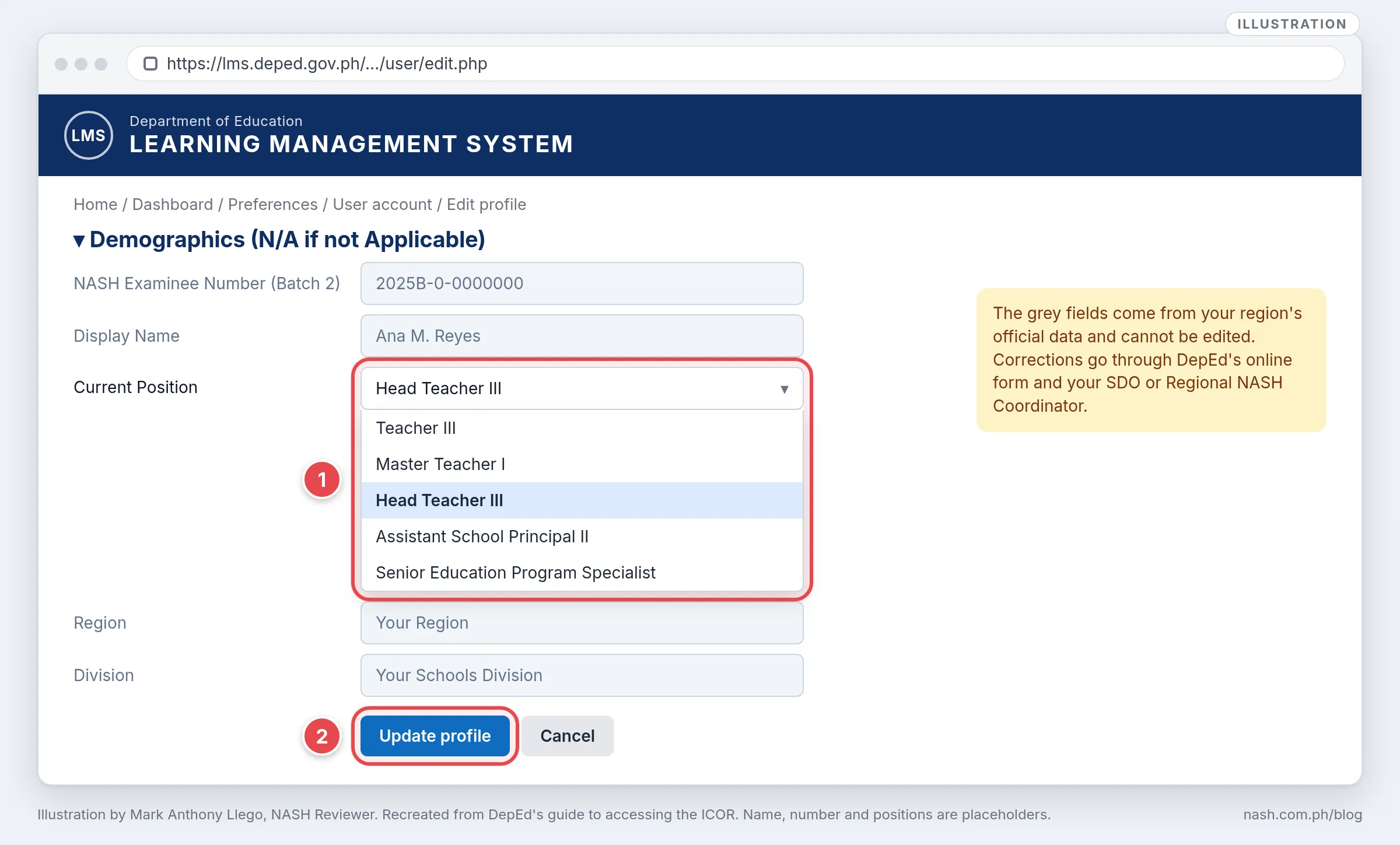
Only the position can be changed. The guide’s note: “Other profile details cannot be edited. If corrections are needed, concerned participants are requested to accomplish the online form via this link: https://tinyurl.com/NASHB2-concerns.” Its reminder adds that “All information reflected in your profile is based on the official data submitted by your respective Region”, so a correction “should also be coordinated with your SDO and/or Regional NASH Coordinator.”
You sign in with the same DepEd account you used for the assessment, in an ordinary browser rather than Safe Exam Browser; NASH LMS Login shows each screen, including a forgotten password.
If the Certificate of Rating link is missing
The link is “hidden otherwise”: it appears only when both conditions are met on the account you used for the assessment (ICOR access guide, steps 2 and 6).
| What is wrong | What to do | Source |
|---|---|---|
| The NASH activity is not marked complete | Neither DepEd document names a remedy; write to the BHROD Human Resource Development Division at bhrod.hrdd@deped.gov.ph | ICOR access guide, closing note; DM 044, s. 2026, para. 9 |
| Your NASH Examinee Number (Batch 2) field is empty | You cannot type it yourself; file the form at tinyurl.com/NASHB2-concerns and coordinate with your SDO or Regional NASH Coordinator | DM 044, s. 2026, para. 7; ICOR access guide, reminder |
| You logged in with a different account | Log in with the DepEd account you used during the assessment | ICOR access guide, step 2 |
| Your name or other details are wrong | File the correction form; a name is not changed in the profile | DM 044, s. 2026, para. 7 |
| Anything else | Email bhrod.hrdd@deped.gov.ph | ICOR access guide, closing note; DM 044, s. 2026, para. 9 |
Batch 1 takers got their ICR the same way, but DM 097, s. 2025 asked them to update three fields first “To ensure accurate ICR data”: User Role (“Change to NASH Taker”), Schools Division Office, and NASH Examinee Number (“Enter the Examinee Code/Number provided by your respective region”) (para. 8).
How DepEd computes your NASH scores
DM 044, s. 2026 describes the method, “Consistent with the methodology used in the FY 2025 NASH (Batch 1)”: the Ordinal Partial Credit Model with “a multi-level scoring approach” (para. 4).
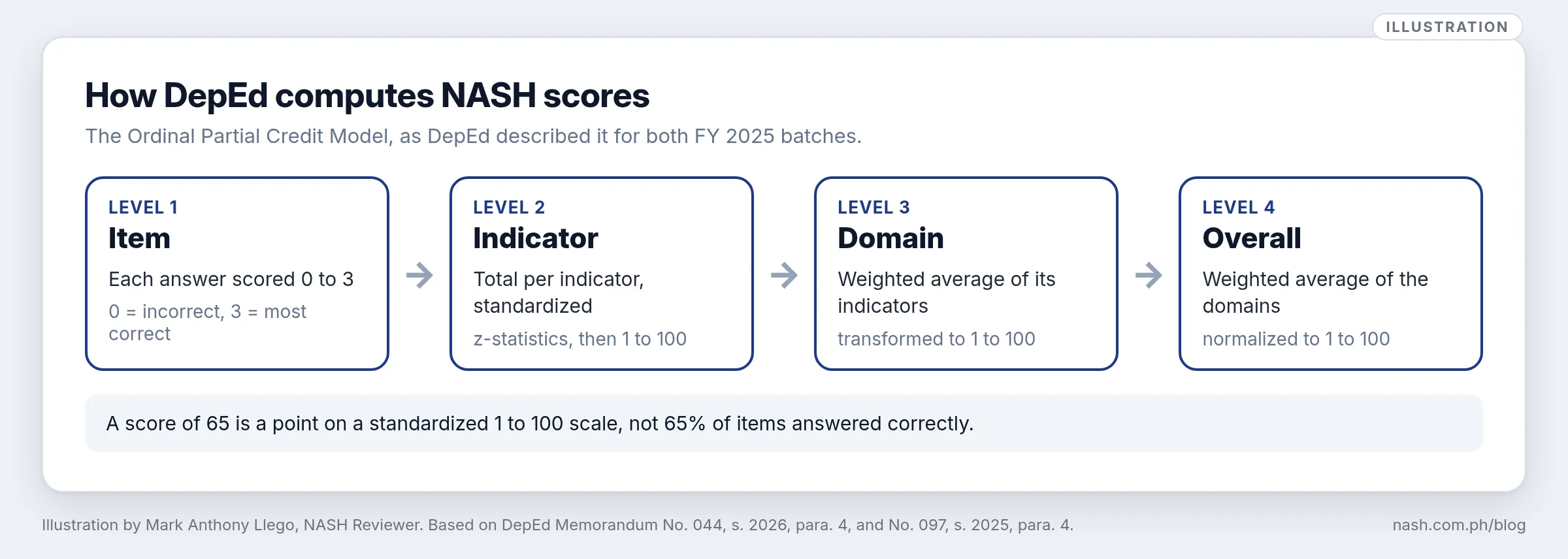
- Item: each response “was scored on a 0–3 scale, where 0 = incorrect and 3 = most correct”.
- Indicator: the total for each indicator was “standardized using z-statistics to ensure comparability, and subsequently converted to a scale of 1–100”.
- Domain: “a weighted average of the z-scores for all indicators within each domain”, transformed to 1 to 100.
- Overall: “a weighted average of the z-scores of all domains, normalized to a 1 to 100 scale”.
Because the scores are standardized, a 65 is not 65% of items correct. DM 044 does not say whether the two batches’ scores were put on one scale, so a score from one batch may not mean the same as a score from the other. NASH Results 2025 Explained sets out what a 65 can and cannot mean.
How your scores set your competency level
“The Overall Score and the Domain Scores were considered in determining the Competency Level” (DM 044, s. 2026, para. 5):
| Competency level | Criteria | What follows |
|---|---|---|
| Meeting PPSSH standards in four domains | “a score of 65 or higher in the overall rating and in the specific ratings of at least four (4) domains” | “Prospective candidates for entry-level school principal positions, subject to assessment and evaluation against the prescribed qualification standards and applicable DepEd hiring guidelines” |
| Meeting PPSSH standards in three domains | 65 or higher overall and in at least three domains | Prospective candidates on the same terms; “participation in a Targeted Development Program (TDP) facilitated by NEAP, addressing at least one identified area for improvement, is required within three months of appointment” |
| With Developmental Areas | Below 65 overall, or 65 or higher overall with fewer than three domains at that level | “Must undertake Professional Development Interventions (PDI) facilitated by NEAP” and complete the PDI and a Work Application Plan “duly certified by the Schools Division Superintendent (SDS)” before being considered for School Principal I |
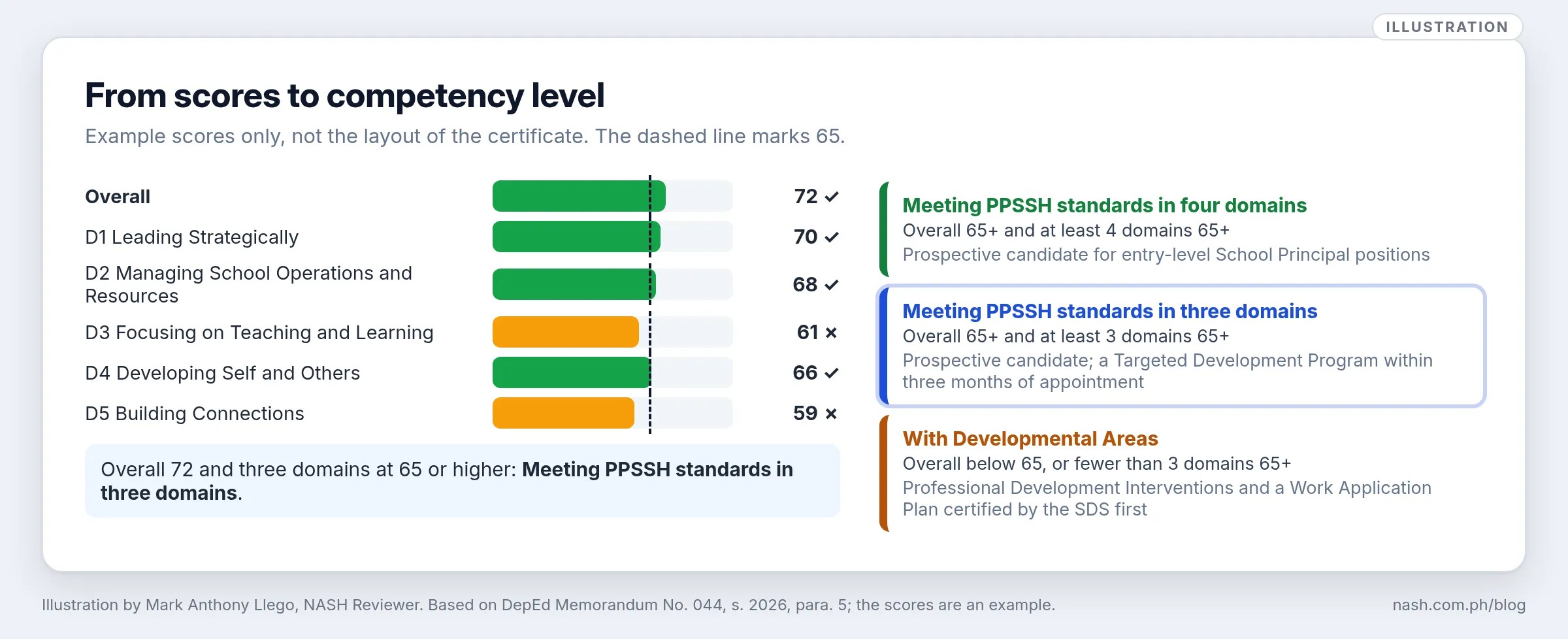
The NASH is not pass or fail. DM 044 calls it “a developmental assessment tool designed to identify areas for improvement and support leadership growth” (para. 2). The domains below 65 point to the work ahead: NASH TDP and PDI explains the programs, and From NASH Results to a PPSSH Development Plan turns the scores into goals.
What this means for school heads
- Help takers get the certificate. Remind teachers to set their Current Position and, when the link is missing, to file the correction form and tell the SDO; the examinee number cannot be typed in by the taker.
- Ask to see it only with consent. The ICOR carries a personal result. Look at it, or the IDR, only when the teacher chooses to share it.
- Read it for development, not ranking. Help a teacher with a domain below 65 pick practice tasks in the school, and keep the programs their level requires in view.
Supporting teachers through their development serves PPSSH Domain 4; see PPSSH Domain 4 for the NASH: Developing Self and Others.
Frequently asked questions
How do I download my NASH ICOR?
Log in at lms.deped.gov.ph with the account you used in the assessment, update your Current Position under Edit profile, open the NASH Batch 2 course, click Certificate of Rating, then View certificate (ICOR access guide, steps 1–7).
Why can’t I see the Certificate of Rating in the LMS?
It is hidden until the NASH activity is marked complete and your NASH Examinee Number (Batch 2) is in your profile (step 6). You cannot fill in the number yourself; file the form at tinyurl.com/NASHB2-concerns and coordinate with your SDO or Regional NASH Coordinator (DM 044, s. 2026, para. 7).
What is the difference between the ICR and the ICOR?
They are the names DepEd used for the certificate in the two FY 2025 batches: ICR for Batch 1 (DM 097, s. 2025, para. 8) and ICOR for Batch 2 (DM 044, s. 2026, para. 7). Both are downloaded from the DepEd LMS.
Can I correct my name or position on the ICOR?
You can select your position in the LMS before you download the ICOR. “Other profile details cannot be edited”; corrections go through the online form and your SDO or Regional NASH Coordinator (DM 044, s. 2026, para. 7; ICOR access guide, reminder).
What score do I need on the NASH?
65 or higher overall and in at least three of the five domains to be a prospective candidate for School Principal I; at least four domains to need no Targeted Development Program after appointment. Below that, you become a prospective candidate only after completing the PDI and a Work Application Plan certified by the SDS (DM 044, s. 2026, para. 5).
Sources
DepEd memoranda
- DepEd Memorandum No. 044, s. 2026, Results of the National Assessment for School Heads for Fiscal Year 2025 (Batch 2), July 4, 2026: paras. 2, 4, 5, 7 and 9
- DepEd Memorandum No. 097, s. 2025, Results of the National Assessment for School Heads for Fiscal Year 2025 (Batch 1), October 21, 2025: paras. 4, 8 and 9
- DepEd Memorandum No. 069, s. 2025, Administration of the National Assessment for School Heads for Fiscal Year 2025, August 11, 2025: para. 12
DepEd guides
- DepEd, Accessing Your Individual Certificate of Rating (ICOR) via the DepEd Learning Management System (LMS), FY 2025 NASH Batch 2: steps 1–7, note, reminder and closing note
Written by Mark Anthony Llego for NASH Reviewer. Illustrations by Mark Anthony Llego; they may be reused only with written permission from support@nash.com.ph. Sources: DepEd Memoranda No. 069 and No. 097, s. 2025, and No. 044, s. 2026; DepEd’s guide to accessing the ICOR. NASH Reviewer is not affiliated with DepEd.