

The e-SAT for teachers, DepEd’s Electronic Self-Assessment Tool (e-SAT) 2025-2028, is the Excel file in which every public school teacher rates their own Level of Capability and Priority for Development on all 37 indicators of the Philippine Professional Standards for Teachers (PPST), then rates the core behavioral competencies. It is Annex A of DepEd Memorandum No. 089, s. 2025, the multi-year Performance Management and Evaluation System (PMES) for teachers, which calls for this full self-assessment “once every three (3) years” and from every newly hired teacher upon assuming duty (item 25). Its results become the teacher’s Individual Development Plan (IDP), and the rater’s Instructional Supervisory (IS) Plan is built from those IDPs (items 26 and 27).
Each teacher answers the file alone, sets a password, and submits it to the school head or department head. The school then runs DepEd’s e-SAT Consolidation Tool once over all the files, which averages the answers by indicator and prints certificates of completion. The e-SAT itself bars the school head from seeing a teacher’s results.
The rules below are those in force on November 26, 2026, including the arrangements for School Year (SY) 2026-2027 in Memorandum DM-OSEC-OUHRODI-2026-0003 of November 9, 2026.
Key findings
- Once every three years, or on assuming duty. “A complete self-assessment covering all thirty-seven (37) PPST indicators shall be conducted once every three (3) years”, and newly hired teachers accomplish it “upon assumption to duty as part of their induction and onboarding” (DM 089, s. 2025, item 25).
- Two answers for each indicator. The e-SAT asks a Level of Capability and a Priority for Development for each of the 37 indicators, each on its scale of 1 Low, 2 Moderate, 3 High and 4 Very High, then rates 35 behavioral indicators of seven core competencies from 5 to 1. Master Teachers also rate 15 leadership indicators (e-SAT 2025-2028, Parts II, II-A and III).
- Teachers I to III answer the Proficient indicators. The tool sends Beginning towards Proficient teachers to the same Part II as Teachers IV to VII, as DM 089 has them “adopt the indicators under the Career Stage II (Proficient)” (item 18).
- The IDP comes from the results. The teacher prepares “a multiyear Individual Development Plan (IDP)” from the full self-assessment, and the rater prepares the IS Plan “guided by the Individual Development Plans (IDPs)” (DM 089, items 26 and 27). An annual IDP on the year’s focus indicators is still required every year (item 25).
- One consolidation per school. DepEd’s instructions say “There should only be ONE consolidation per school.” The tool skips any file that is incomplete, a duplicate, from another school ID, or not made from DepEd’s template, and lists each one with the reason (e-SAT Consolidation Tool 2025-2028, Home sheet and read log).
- The certificate was evidence in SY 2025-2026 only. The SY 2025-2026 PMES tool lists a “Certification from the ICT Coordinator / School Head / Focal Person in charge of e-SAT” for indicator 7.5.2. In SY 2026-2027, Teachers I to VII are rated on 7.4.2, with the “Updated Individual Development Plan (IDP)” as evidence (PMES Tools for SY 2025-2026 and SY 2026-2027).
- Results stay with the teacher. The e-SAT says the school head is not allowed to see a teacher’s results, though the teacher may discuss the development plan built from them (e-SAT, HOME sheet).
Download the e-SAT 2025-2028 and the consolidation tool
The four files below are DepEd’s, unchanged, from the PMES tools folder that DM 089 names (item 96), which opens only with an official DepEd email address. The three Excel files run macros: open them in Microsoft Excel on a computer and enable content, or their buttons do nothing.
- e-SAT for Teachers 2025-2028, version 2 of November 2025 (Excel with macros, 946 KB), for every teacher and Master Teacher in a school.
- e-SAT 2025-2028, version 2, for ALS teachers only (Excel with macros, 948 KB), for Alternative Learning System (ALS) teachers, including those in community learning centers (CLCs).
- e-SAT Consolidation Tool 2025-2028, version 1 of November 2025 (Excel with macros, 298 KB), for the one person who consolidates a school’s files.
- Step-by-step instructions in consolidating the e-SAT (PDF, 2 pages, 70 KB), DepEd’s seven steps, the same ones printed on the consolidation tool’s first sheet.
Download a fresh copy for each teacher. Once a teacher saves their answers, the file takes no more changes, so a copy that has been answered cannot be passed to the next teacher.
What the e-SAT is and who answers it
The e-SAT is the “Self-Assessment Tool (SAT)” that DM 089’s annual timeline lists under Phase I, Performance Planning and Commitment, beside the Individual Performance Commitment and Review Form (IPCRF), the initial IDP and the IS Plan (DM 089, Table 1). DM 089 lists it as “Annex A: Teacher Self-Assessment Tool (Excel-based)” (item 96). Item 24 says what it is for: “Teachers as ratees shall assess their own capability and areas of improvement on the PPST Indicators. They shall also assess their potential demonstration of core and leadership competencies, whenever applicable.”
Every public school teacher answers it, Teachers I to VII and Master Teachers I to V, including teachers in ALS, the Madrasah Program, Special Needs Education and special science programs (DM 089, item 6). The 37 indicators are the PPST’s 37 strands at the teacher’s career stage, explained in the guide to the PPST. The career stage follows the position (DM 089, Table 2):
| Position | Career stage | Part II of the e-SAT | Leadership competencies (Part II-A) |
|---|---|---|---|
| Teachers I to III | Beginning towards Proficient | Proficient indicators (codes ending in .2) | Not asked |
| Teachers IV to VII | Proficient | Proficient indicators (.2) | Not asked |
| Master Teachers I and II | Highly Proficient | Highly Proficient indicators (.3) | Asked |
| Master Teachers III to V | Distinguished | Distinguished indicators (.4) | Asked |
The tool’s first page still speaks of “RPMS objectives” and “the RPMS cycle”, the Results-based Performance Management System that the PMES replaced (DM 089, Rationale, items 1 to 3). The words date from the RPMS; the 2025-2028 version rates the PMES indicators of DM 089.
When to answer the e-SAT
A teacher answers the full e-SAT once in each three-year cycle, and the current cycle runs from SY 2025-2026 to SY 2027-2028. DM 089 sets it in Phase I, “From one (1) month before to one (1) month after the official start of classes” (Table 1), and the e-SAT’s first page asks teachers to “accomplish this tool prior to the beginning of the school year.” DM 089 adds that “The next full self-assessment shall be conducted only after the 3-year cycle is completed and all 37 PPST indicators have been assessed through the annual performance management process” (item 25).
So, in SY 2026-2027:
- A teacher who answered the e-SAT in SY 2025-2026 does not answer it again. That teacher updates the IDP for the year: “the conduct of annual individual development planning based on the focus PPST Indicators shall still be required at the end of the performance cycle” (item 25).
- A newly hired teacher answers the full e-SAT “upon assumption to duty as part of their induction and onboarding” (item 25), whatever the month.
- A teacher promoted to another career stage is rated on the new stage’s indicators only after 90 days of service in the new position (DM 089, item 94). DM 089 does not say whether such a teacher answers a new e-SAT. The safer course is to agree with the rater which indicators the next IDP covers.
DM 089 was issued on October 1, 2025, after the first quarter of SY 2025-2026, and version 2 of the e-SAT is dated November 2025, so many teachers answered it late in that school year. Nothing in DM 089 or the two guidance memoranda asks them to answer it again.
How to answer the e-SAT, step by step
The e-SAT moves from sheet to sheet by its own buttons, and each button checks the sheet before it lets you go on. Answer alone, and finish in one sitting if you can.
Open the right file, the right way
Save a fresh copy of the file to your own computer and open it in Microsoft Excel, not in Google Sheets, OneDrive or a phone app. Click Enable Editing and Enable Content when Excel asks, because every button in the file is a macro. ALS teachers use the ALS version (see “The e-SAT for ALS teachers” below).
HOME: choose your career stage
On the HOME sheet, choose your career stage from the “Select Career Stage” list: Beginning towards Proficient, Proficient, Highly Proficient or Distinguished. Then click START. Choose by your position as the table above shows; a Teacher III who picks Highly Proficient answers a Master Teacher’s indicators.
Privacy Notice and Demographic Profile
The Privacy Notice reads: “I authorize the personnel of Department of Education to collect, process, retain, and dispose my personal information in accordance with the Data Privacy Act of 2012.” AGREE goes on; DISAGREE returns to HOME.
The Demographic Profile asks for your school (region, division, school ID, school name, type, size, curricular classification) and yourself (name, employee ID, position, employment status, age, sex, years in teaching, highest degree, level taught, DepEd email address, TIN), then the grade levels, areas of specialization, and the subjects or strands you teach. NEXT will not move until you “Fill up all fields” in both blocks and “Mark at least one checkbox under AREA(S) OF SPECIALIZATION”, plus one subject for Junior High School or one strand for Senior High School. The position list shows only the positions of the career stage you chose. In version 2, the Distinguished list offers Master Teacher III and Master Teacher IV but no Master Teacher V; a Master Teacher V should ask the school’s e-SAT focal person which to choose.
Type your school ID carefully. The consolidation tool reads a file only if its school ID matches the one typed in the tool, so a mistyped ID leaves your e-SAT out of the school’s results.
Part II: the 37 indicators
Part II lists the 37 indicators by domain, each with its type (COI for a classroom observable indicator, NCOI for a non-classroom observable one) and the year of the cycle in which the PMES rates it. Its instruction reads: “There are two columns for every objective. Please click one circle in each column corresponding to how you rate your (1) level of capability and (2) priority for development for each objective.”
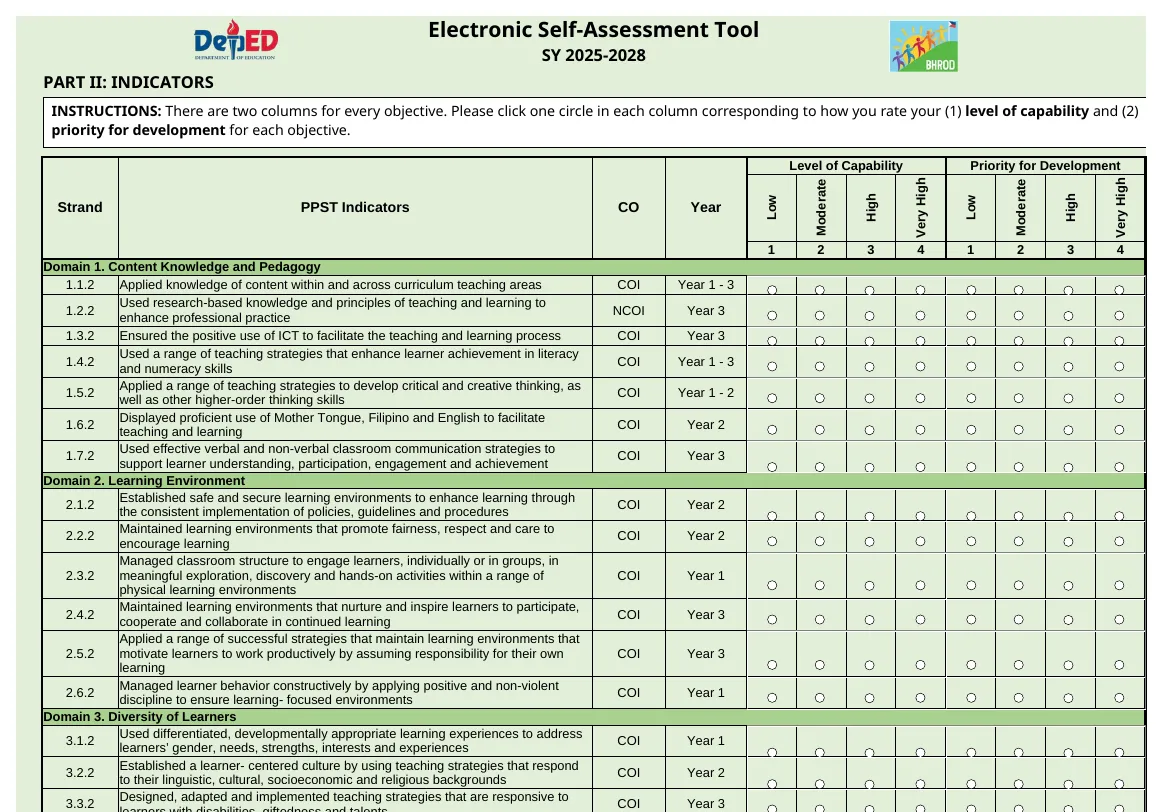
Read the two columns as two different questions:
- Level of Capability asks how well you do this now: 1 Low, 2 Moderate, 3 High or 4 Very High.
- Priority for Development asks how much you need to develop it in this cycle, on the same four words.
The two are independent. A teacher can be highly capable in giving feedback and still rate it a high priority because the school’s assessment results call for more, or rate a strand low on both because it has not come up in their classes yet. A low priority can hide a need: in SY 2026-2027 a teacher with no learners from indigenous groups is still rated on 3.5.2, from lesson-plan annotations (DM-OSEC-OUHRODI-2026-0003, item 15). Next checks that all 37 rows have both answers, and stops with “Select Level of Capability for each row” and “Select Priority for Development for each row” if one is missing.
Rate what you do in your regular teaching, not what you plan to do. The blog’s invented sample study on technical assistance shows why it matters: its teachers rated their capability High or Very High in 82.1% of their answers, while the observations found needs the self-ratings had missed.
Part II-A: leadership competencies (Master Teachers)
Highly Proficient and Distinguished teachers then rate 15 behavioral indicators of three leadership competencies, Leading People, People Performance Management and People Development, each from 5 to 1. The sheet explains that these “shall capture competencies expected of heads of functional offices who hold managerial and executive/supervisory positions.” Teachers I to VII skip this part. The guide to the Master Teacher’s IPCRF covers how these competencies are rated in the PMES.
Part III: core behavioral competencies
Part III lists five behavioral indicators for each of seven core competencies: Self-Management, Professionalism and Ethics, Results Focus, Teamwork, Service Orientation, Innovation and Gender Sensitivity. Each indicator takes a number on DepEd’s competency scale:
| Rating | Word | What the e-SAT says it means |
|---|---|---|
| 5 | Outstanding | “Role Model - Behavioral indicator is consistently exhibited and is worthy of emulation” |
| 4 | Very Satisfactory | “Consistently Demonstrated - Behavioral indicator is constantly showed” |
| 3 | Satisfactory | “Most of the Time Demonstrated - Behavioral indicator is often showed” |
| 2 | Unsatisfactory | “Sometimes Demonstrated - Behavioral indicator is irregularly showed” |
| 1 | Poor | “Rarely Demonstrated -Behavioral indicator is seldomly showed” |
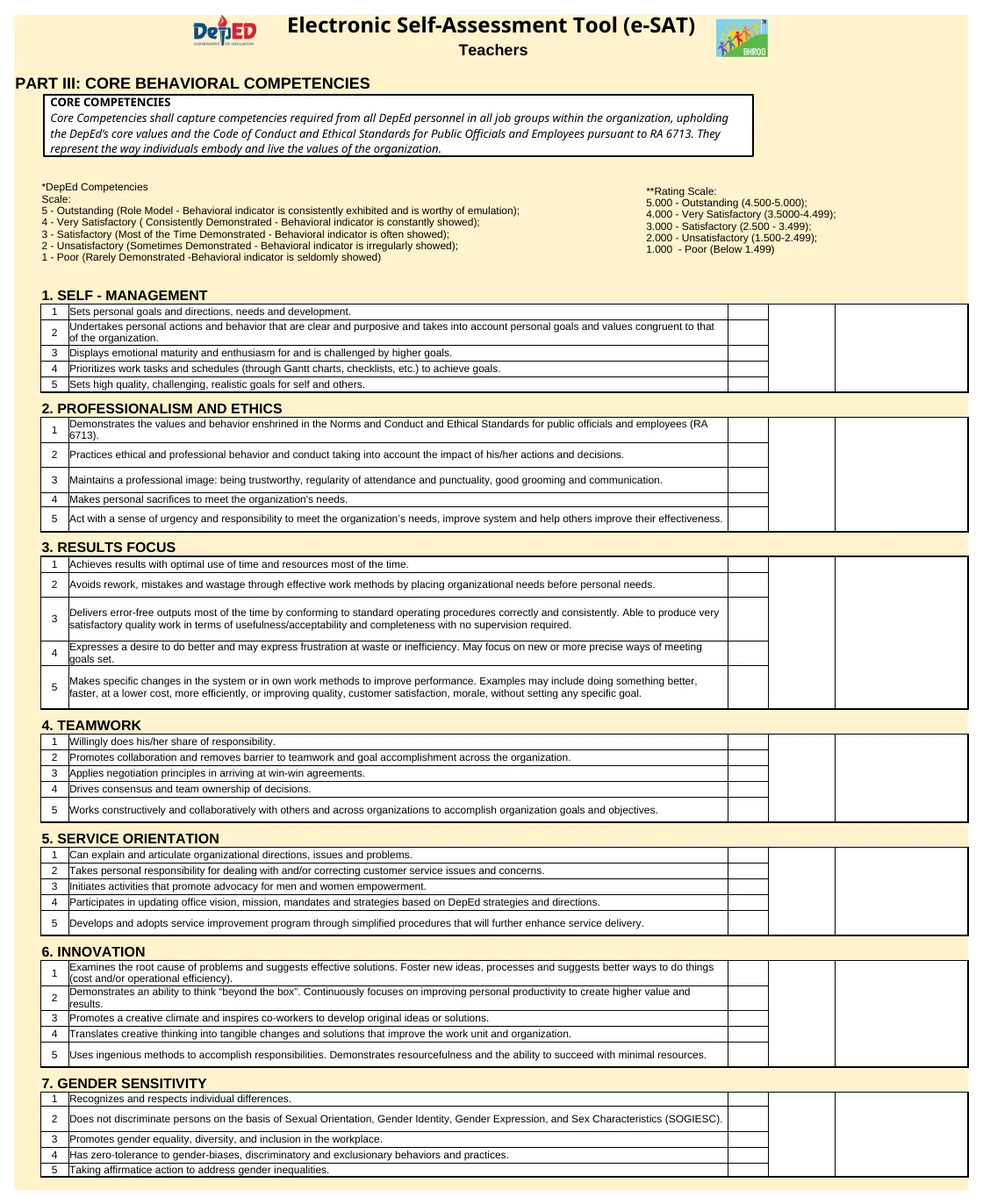
DM 089 lists six core competencies for the IPCRF and does not name Innovation (item 22), while the e-SAT rates seven. The guide to DepEd’s core behavioral competencies sets out each one and where the lists differ.
SAVE and the password
SAVE on Part III is the point of no return. The tool first checks that all 35 ratings are in, then warns: “This will save the file. After which, you can no longer edit your responses. If any changes should be done, you will need to start over using a fresh copy of this file.” Read your answers again before you click OK.
If no password is set yet, a box with the words “Set password to lock file.” asks for one, and it cannot be blank. The same box appears if you save or close the file before reaching SAVE, as soon as anything is typed in the profile; a password set then is not asked for again at SAVE. From then on, when the file is opened in Excel with its macros enabled, it asks for that password: a wrong one brings “Access denied. The password you entered is INCORRECT.” and the file closes.
This is what the file’s code does, and the check is itself a macro. With macros off, or in Excel’s Protected View, which keeps them off, the file opens without asking for the password, on the sheet that showed at its last save; after SAVE, that is the Summary with every answer. The consolidation tool also opens every file without asking. The file keeps the password inside itself, so use one you use nowhere else. Nothing in the file changes or recovers it.
Summary, FINISH and the IDP sheet
The Summary sheet prints your profile, each indicator grouped by the year the PMES rates it (“INDICATORS - YEAR 1”, “YEAR 2”, “YEAR 3”) with the words you chose, and your competency ratings with their averages. PRINT opens a print preview; the printed pages carry the word “Confidential” in their header.
Click FINISH. The tool shows “SURVEY COMPLETED” with the line “Submit this file to your Department Head or School Head for consolidation”, reminds you “Please accomplish Multi-year Individual Development Plan (IDP)”, and opens the IDP sheet. Then save the file (Ctrl+S, or Save when Excel asks as you close it). FINISH changes the file but does not save it, and the consolidation tool skips as “not completed” any file not saved after FINISH.
What the e-SAT computes
The e-SAT adds up only the competencies. For each core competency, and each leadership competency of a Master Teacher, it averages the five ratings and gives the average a word from its rating scale: 4.500 to 5.000 Outstanding, 3.500 to 4.499 Very Satisfactory, 2.500 to 3.499 Satisfactory, 1.500 to 2.499 Unsatisfactory, and below 1.499 Poor (e-SAT, Part III). A teacher who rates Teamwork 5, 4, 4, 3 and 4 averages 4.0, Very Satisfactory.
The 37 indicators get no score. The Summary repeats each answer as a word and groups the indicators by year, and nothing in Part II ranks them or names a strength or a development need. Turning the answers into a plan is the teacher’s work, done in the IDP sheet.
The e-SAT for ALS teachers
The ALS version asks the same 37 indicators, the same competencies and the same password; its sheets and formulas match the regular file’s. It differs in two places. Its Demographic Profile does not require a school ID, school name, school type or school size before it moves on. Its IDP sheet’s HIDE / UNHIDE EXTRA ROWS button also tidies the Leadership Competencies block, hiding it for Teachers I to VII. Both versions mark the school ID, type and size “optional for ALS-CLC” and say: “For ALS, select Community-based Learning Center in the Curricular Classification field and leave optional school data fields blank (school ID, type, size) if the CLC is non-school-based.”
One consequence follows from how the consolidation tool works: it reads only files whose school ID matches the one typed in it, so an ALS teacher in a non-school-based CLC who leaves the ID blank is left out of any school’s consolidation. As of November 26, 2026, DepEd’s instructions do not say who consolidates those files. DM 089 has the Functional Division Chief for the Curriculum Implementation Division (CID) rate ALS teachers in a CLC (Table 18), so the division office is the one to ask.
From e-SAT results to the IDP and the IS Plan
The IDP is written from the e-SAT. DM 089 says: “Based on the result of the full self-assessment, the ratee (teacher) shall prepare a multiyear Individual Development Plan (IDP) and discuss with the rater which PPST indicators and competencies they must enhance in the particular school year and in which areas coaching and mentoring are necessary” (item 26). The IDP is Part IV of the IPCRF (DM 089, Figure 1 and Table 1), and the e-SAT carries its own IDP sheet for the first draft.
The IDP sheet’s columns are Strengths, Development Needs, an Action Plan of Learning Objectives and Intervention, Timeline, and Resources Needed, in three blocks: Functional Competencies, Core Behavioral Competencies and Leadership Competencies. A fourth table below them, “PPST Indicators for Development from the Teacher’s Commitment Form”, takes up to three indicators with their action plan, timeline and resources. A Feedback row and signature lines for the ratee, the rater and the approving authority close the sheet. Its instruction sets when the plan is written and updated:
“This sheet shall be accomplished and updated during the following phases: i) Phase I – Performance Planning and Commitment, based on the results of the e-SAT; ii) Phase II – Performance Monitoring and Coaching, based on the agreements in the Performance Monitoring and Coaching Form; and iii) Phase IV – Performance Rewarding and Development Planning, based on the actual results of the IPCRF. The Individual Development Plan (IDP) shall be updated annually based on the focus indicators of the PMES for Teachers for the school year and the teacher’s actual performance.” (e-SAT, IDP sheet)
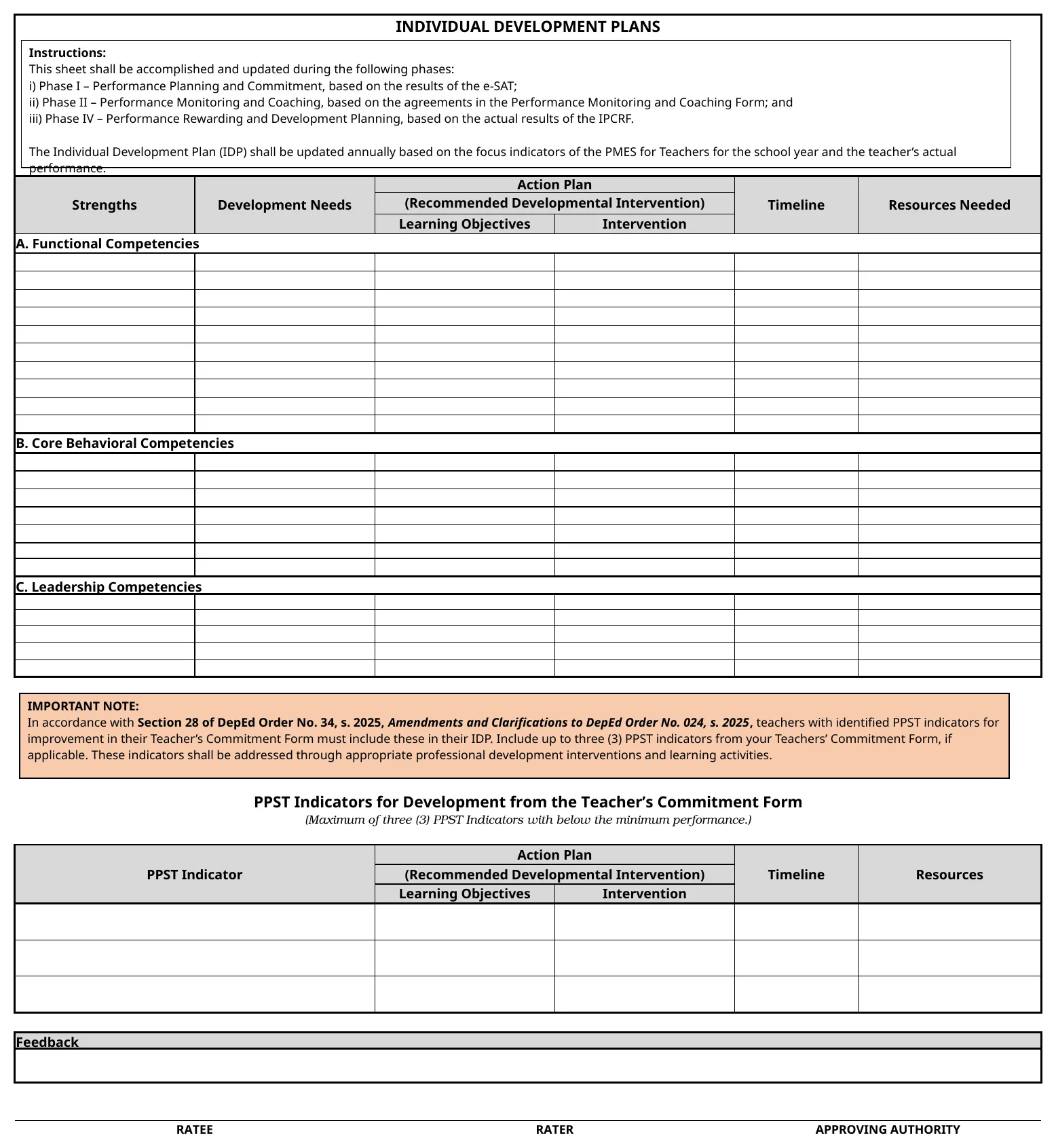
The Phase II updates come from the agreements recorded in the coaching form, explained in the guide to the Performance Monitoring and Coaching Form. A note above that fourth table explains it. A teacher considered for promotion under the transition rules of DepEd Order No. 034, s. 2025 signs a Teacher’s Commitment Form on PPST Indicators for Development, with at most three indicators (items 28 and 29), and the note says to “Include up to three (3) PPST indicators from your Teachers’ Commitment Form, if applicable.”
Which indicators go in this year’s IDP
A development plan for SY 2026-2027 works on the year’s 12 indicators, the ones the PMES rates that year (DM-OSEC-OUHRODI-2026-0003, item 14, Table 1), since the IDP sheet has the plan “updated annually based on the focus indicators of the PMES for Teachers for the school year”. The guide to PMES 2026-2027 lists them and how each is rated. Your e-SAT answers on those 12 tell you where to start, and both SY 2026-2027 tools for 7.4.2 ask for that kind of order. The tool for Teachers IV to VII: “Prioritized development needs refer to identified areas for improvement arranged according to their relevance or urgency.” The tool for Teachers I to III: “Prioritized development needs refer to development needs arranged according to their relevance or urgency in improving teaching practice.” The figure below sorts your answers that way.
Try it: the e-SAT’s Part II, SY 2026-2027
From your e-SAT answers to this year’s IDP
Mark the two answers the e-SAT asks for each of the 12 indicators rated in SY 2026-2027. The draft under the form sorts them for your Individual Development Plan (IDP). An invented teacher’s answers are filled in; change them to yours.
All 12 indicators marked: 5 development needs, 5 strengths, 2 to talk over with your rater.
This is the draft for the invented teacher’s answers; the figure needs scripting to sort yours.
Development needs, most urgent first(5)
Priority for Development High or Very High. Higher priority first; at equal priority, the lower Level of Capability first.
5.3.25.3.35.3.4 Used strategies for providing timely, accurate and constructive feedback to improve learner performanceUsed effective strategies for providing timely, accurate and constructive feedback to encourage learners to reflect on and improve their own learningExhibited exemplary skills and lead initiatives to support colleagues in applying strategies that effectively provide timely, accurate and constructive feedback to learners to improve learning achievement.
Level of Capability: Moderate. Priority for Development: Very High.
5.5.25.5.35.5.4 Utilized assessment data to inform the modification of teaching and learning practices and programsWorked collaboratively with colleagues to analyze and utilize assessment data to modify practices and programs to further support learner progress and achievementLead colleagues to explore, design and implement effective practices and programs using information derived from assessment data.
Level of Capability: Moderate. Priority for Development: Very High.
1.6.21.6.31.6.4 Displayed proficient use of Mother Tongue, Filipino and English to facilitate teaching and learningModelled and supported colleagues in the proficient use of Mother Tongue, Filipino and English to improve teaching and learning, as well as to develop learners’ pride of their language, heritage and cultureShowed exemplary skills in and advocate the use of Mother Tongue, Filipino and English in teaching and learning to facilitate the learners’ language, cognitive and academic development and to foster pride of their language, heritage and culture.
Level of Capability: Moderate. Priority for Development: High.
7.4.27.4.37.4.4 Developed a personal improvement plan based on reflection of one’s practice and ongoing professional learningInitiated professional reflections and promote learning opportunities with colleagues to improve practiceDemonstrated leadership within and across school contexts in critically evaluating practice and setting clearly defined targets for professional development.
Level of Capability: Moderate. Priority for Development: High.
3.2.23.2.33.2.4 Established a learner- centered culture by using teaching strategies that respond to their linguistic, cultural, socioeconomic and religious backgroundsExhibited a learner-centered culture that promotes success by using effective teaching strategies that respond to their linguistic, cultural, socioeconomic and religious backgroundsModelled exemplary teaching practices that recognize and affirm diverse linguistic, cultural, socio economic and religious backgrounds to promote learner success.
Level of Capability: High. Priority for Development: High.
1.1.21.1.31.1.4 Applied knowledge of content within and across curriculum teaching areasModelled effective applications of content knowledge within and across curriculum teaching areasModelled exemplary practice to improve the applications of content knowledge within and across curriculum teaching areas.
Level of Capability: High. Priority for Development: Moderate.
2.1.22.1.32.1.4 Established safe and secure learning environments to enhance learning through the consistent implementation of policies, guidelines and proceduresExhibited effective strategies that ensure safe and secure learning environments to enhance learning through the consistent implementation of policies, guidelines and proceduresApplied comprehensive knowledge of and act as a resource person for, policies, guidelines and procedures that relate to the implementation of safe and secure learning environments for learners.
Level of Capability: Very High. Priority for Development: Low.
2.2.22.2.32.2.4 Maintained learning environments that promote fairness, respect and care to encourage learningExhibited effective practices to foster learning environments that promote fairness, respect and care to encourage learningAdvocated and facilitate the use of effective practices to foster learning environments that promote fairness, respect and care to encourage learning.
Level of Capability: Very High. Priority for Development: Low.
3.5.23.5.33.5.4 Adapted and used culturally appropriate teaching strategies to address the needs of learners from indigenous groupsDeveloped and applied teaching strategies to address effectively the needs of learners from indigenous groupsShowed comprehensive skills in delivering culturally appropriate teaching strategies to address effectively the needs of learners from indigenous groups.
Level of Capability: Low. Priority for Development: Moderate.
4.2.24.2.34.2.4 Set achievable and appropriate learning outcomes that are aligned with learning competenciesModelled to colleagues the setting of achievable and challenging learning outcomes that are aligned with learning competencies to cultivate a culture of excellence for all learnersExhibited high-level skills and lead in setting achievable and challenging learning outcomes that are aligned with learning competencies towards the cultivation of a culture of excellence for all.
Level of Capability: High. Priority for Development: Moderate.
6.2.26.2.36.2.4 Built relationships with parents/ guardians and the wider school community to facilitate involvement in the educative processGuided colleagues to strengthen relationships with parents/ guardians and the wider school community to maximize their involvement in the educative processLead in consolidating networks that strengthen relationships with parents/guardians and the wider school community to maximize their involvement in the educative process.
Level of Capability: High. Priority for Development: Moderate.
7.3.27.3.37.3.4 Participated in professional networks to share knowledge and to enhance practiceContributed actively to professional networks within and between schools to improve knowledge and to enhance practiceTook a leadership role in supporting colleagues’ engagement with professional networks within and across schools to advance knowledge and practice in identified areas of need.
Level of Capability: Moderate. Priority for Development: Moderate.
None yet.
In the IDP sheet, write for each one the Learning Objectives, Intervention, Timeline and Resources Needed.
Strengths(5)
Level of Capability High or Very High, and Priority for Development Low or Moderate. Higher capability first.
2.1.22.1.32.1.4 Established safe and secure learning environments to enhance learning through the consistent implementation of policies, guidelines and proceduresExhibited effective strategies that ensure safe and secure learning environments to enhance learning through the consistent implementation of policies, guidelines and proceduresApplied comprehensive knowledge of and act as a resource person for, policies, guidelines and procedures that relate to the implementation of safe and secure learning environments for learners.
Level of Capability: Very High. Priority for Development: Low.
2.2.22.2.32.2.4 Maintained learning environments that promote fairness, respect and care to encourage learningExhibited effective practices to foster learning environments that promote fairness, respect and care to encourage learningAdvocated and facilitate the use of effective practices to foster learning environments that promote fairness, respect and care to encourage learning.
Level of Capability: Very High. Priority for Development: Low.
1.1.21.1.31.1.4 Applied knowledge of content within and across curriculum teaching areasModelled effective applications of content knowledge within and across curriculum teaching areasModelled exemplary practice to improve the applications of content knowledge within and across curriculum teaching areas.
Level of Capability: High. Priority for Development: Moderate.
4.2.24.2.34.2.4 Set achievable and appropriate learning outcomes that are aligned with learning competenciesModelled to colleagues the setting of achievable and challenging learning outcomes that are aligned with learning competencies to cultivate a culture of excellence for all learnersExhibited high-level skills and lead in setting achievable and challenging learning outcomes that are aligned with learning competencies towards the cultivation of a culture of excellence for all.
Level of Capability: High. Priority for Development: Moderate.
6.2.26.2.36.2.4 Built relationships with parents/ guardians and the wider school community to facilitate involvement in the educative processGuided colleagues to strengthen relationships with parents/ guardians and the wider school community to maximize their involvement in the educative processLead in consolidating networks that strengthen relationships with parents/guardians and the wider school community to maximize their involvement in the educative process.
Level of Capability: High. Priority for Development: Moderate.
1.6.21.6.31.6.4 Displayed proficient use of Mother Tongue, Filipino and English to facilitate teaching and learningModelled and supported colleagues in the proficient use of Mother Tongue, Filipino and English to improve teaching and learning, as well as to develop learners’ pride of their language, heritage and cultureShowed exemplary skills in and advocate the use of Mother Tongue, Filipino and English in teaching and learning to facilitate the learners’ language, cognitive and academic development and to foster pride of their language, heritage and culture.
Level of Capability: Moderate. Priority for Development: High.
3.2.23.2.33.2.4 Established a learner- centered culture by using teaching strategies that respond to their linguistic, cultural, socioeconomic and religious backgroundsExhibited a learner-centered culture that promotes success by using effective teaching strategies that respond to their linguistic, cultural, socioeconomic and religious backgroundsModelled exemplary teaching practices that recognize and affirm diverse linguistic, cultural, socio economic and religious backgrounds to promote learner success.
Level of Capability: High. Priority for Development: High.
3.5.23.5.33.5.4 Adapted and used culturally appropriate teaching strategies to address the needs of learners from indigenous groupsDeveloped and applied teaching strategies to address effectively the needs of learners from indigenous groupsShowed comprehensive skills in delivering culturally appropriate teaching strategies to address effectively the needs of learners from indigenous groups.
Level of Capability: Low. Priority for Development: Moderate.
5.3.25.3.35.3.4 Used strategies for providing timely, accurate and constructive feedback to improve learner performanceUsed effective strategies for providing timely, accurate and constructive feedback to encourage learners to reflect on and improve their own learningExhibited exemplary skills and lead initiatives to support colleagues in applying strategies that effectively provide timely, accurate and constructive feedback to learners to improve learning achievement.
Level of Capability: Moderate. Priority for Development: Very High.
5.5.25.5.35.5.4 Utilized assessment data to inform the modification of teaching and learning practices and programsWorked collaboratively with colleagues to analyze and utilize assessment data to modify practices and programs to further support learner progress and achievementLead colleagues to explore, design and implement effective practices and programs using information derived from assessment data.
Level of Capability: Moderate. Priority for Development: Very High.
7.3.27.3.37.3.4 Participated in professional networks to share knowledge and to enhance practiceContributed actively to professional networks within and between schools to improve knowledge and to enhance practiceTook a leadership role in supporting colleagues’ engagement with professional networks within and across schools to advance knowledge and practice in identified areas of need.
Level of Capability: Moderate. Priority for Development: Moderate.
7.4.27.4.37.4.4 Developed a personal improvement plan based on reflection of one’s practice and ongoing professional learningInitiated professional reflections and promote learning opportunities with colleagues to improve practiceDemonstrated leadership within and across school contexts in critically evaluating practice and setting clearly defined targets for professional development.
Level of Capability: Moderate. Priority for Development: High.
None yet.
List them under Strengths, and offer them where a colleague needs help.
Talk these over with your rater(2)
Low or Moderate on both. A low priority may hide a need: in SY 2026-2027 a teacher with no learners from indigenous groups is still rated on 3.5, from lesson-plan annotations (memorandum, item 15).
3.5.23.5.33.5.4 Adapted and used culturally appropriate teaching strategies to address the needs of learners from indigenous groupsDeveloped and applied teaching strategies to address effectively the needs of learners from indigenous groupsShowed comprehensive skills in delivering culturally appropriate teaching strategies to address effectively the needs of learners from indigenous groups.
Level of Capability: Low. Priority for Development: Moderate.
7.3.27.3.37.3.4 Participated in professional networks to share knowledge and to enhance practiceContributed actively to professional networks within and between schools to improve knowledge and to enhance practiceTook a leadership role in supporting colleagues’ engagement with professional networks within and across schools to advance knowledge and practice in identified areas of need.
Level of Capability: Moderate. Priority for Development: Moderate.
1.1.21.1.31.1.4 Applied knowledge of content within and across curriculum teaching areasModelled effective applications of content knowledge within and across curriculum teaching areasModelled exemplary practice to improve the applications of content knowledge within and across curriculum teaching areas.
Level of Capability: High. Priority for Development: Moderate.
1.6.21.6.31.6.4 Displayed proficient use of Mother Tongue, Filipino and English to facilitate teaching and learningModelled and supported colleagues in the proficient use of Mother Tongue, Filipino and English to improve teaching and learning, as well as to develop learners’ pride of their language, heritage and cultureShowed exemplary skills in and advocate the use of Mother Tongue, Filipino and English in teaching and learning to facilitate the learners’ language, cognitive and academic development and to foster pride of their language, heritage and culture.
Level of Capability: Moderate. Priority for Development: High.
2.1.22.1.32.1.4 Established safe and secure learning environments to enhance learning through the consistent implementation of policies, guidelines and proceduresExhibited effective strategies that ensure safe and secure learning environments to enhance learning through the consistent implementation of policies, guidelines and proceduresApplied comprehensive knowledge of and act as a resource person for, policies, guidelines and procedures that relate to the implementation of safe and secure learning environments for learners.
Level of Capability: Very High. Priority for Development: Low.
2.2.22.2.32.2.4 Maintained learning environments that promote fairness, respect and care to encourage learningExhibited effective practices to foster learning environments that promote fairness, respect and care to encourage learningAdvocated and facilitate the use of effective practices to foster learning environments that promote fairness, respect and care to encourage learning.
Level of Capability: Very High. Priority for Development: Low.
3.2.23.2.33.2.4 Established a learner- centered culture by using teaching strategies that respond to their linguistic, cultural, socioeconomic and religious backgroundsExhibited a learner-centered culture that promotes success by using effective teaching strategies that respond to their linguistic, cultural, socioeconomic and religious backgroundsModelled exemplary teaching practices that recognize and affirm diverse linguistic, cultural, socio economic and religious backgrounds to promote learner success.
Level of Capability: High. Priority for Development: High.
4.2.24.2.34.2.4 Set achievable and appropriate learning outcomes that are aligned with learning competenciesModelled to colleagues the setting of achievable and challenging learning outcomes that are aligned with learning competencies to cultivate a culture of excellence for all learnersExhibited high-level skills and lead in setting achievable and challenging learning outcomes that are aligned with learning competencies towards the cultivation of a culture of excellence for all.
Level of Capability: High. Priority for Development: Moderate.
5.3.25.3.35.3.4 Used strategies for providing timely, accurate and constructive feedback to improve learner performanceUsed effective strategies for providing timely, accurate and constructive feedback to encourage learners to reflect on and improve their own learningExhibited exemplary skills and lead initiatives to support colleagues in applying strategies that effectively provide timely, accurate and constructive feedback to learners to improve learning achievement.
Level of Capability: Moderate. Priority for Development: Very High.
5.5.25.5.35.5.4 Utilized assessment data to inform the modification of teaching and learning practices and programsWorked collaboratively with colleagues to analyze and utilize assessment data to modify practices and programs to further support learner progress and achievementLead colleagues to explore, design and implement effective practices and programs using information derived from assessment data.
Level of Capability: Moderate. Priority for Development: Very High.
6.2.26.2.36.2.4 Built relationships with parents/ guardians and the wider school community to facilitate involvement in the educative processGuided colleagues to strengthen relationships with parents/ guardians and the wider school community to maximize their involvement in the educative processLead in consolidating networks that strengthen relationships with parents/guardians and the wider school community to maximize their involvement in the educative process.
Level of Capability: High. Priority for Development: Moderate.
7.4.27.4.37.4.4 Developed a personal improvement plan based on reflection of one’s practice and ongoing professional learningInitiated professional reflections and promote learning opportunities with colleagues to improve practiceDemonstrated leadership within and across school contexts in critically evaluating practice and setting clearly defined targets for professional development.
Level of Capability: Moderate. Priority for Development: High.
None yet.
Settle with your rater whether each one belongs in the IDP this year.
“Prioritized development needs refer to development needs arranged according to their relevance or urgency in improving teaching practice.”
PMES Tool for Teachers I to III, SY 2026-2027, indicator 7.4.2, Clarifications
“Prioritized development needs refer to identified areas for improvement arranged according to their relevance or urgency.”
PMES Tool for Teachers IV to VII, SY 2026-2027, indicator 7.4.2, Clarifications
“Based on the result of the full self-assessment, the ratee (teacher) shall prepare a multiyear Individual Development Plan (IDP) and discuss with the rater which PPST indicators and competencies they must enhance in the particular school year and in which areas coaching and mentoring are necessary.”
DM No. 089, s. 2025, item 26
Indicators and scale: DepEd’s e-SAT for Teachers 2025-2028 (version 2, November 2025), Part II. The 12 indicators: Memorandum DM-OSEC-OUHRODI-2026-0003, Table 1.
Write each development need into the IDP sheet with an objective you can check by the end of the year. For 5.3.2 on feedback, “Give written feedback on every summative test within three class days, with one next step for each learner” can be checked; “Improve my feedback” cannot. The intervention can be any of the formative support the November 2026 memorandum lists, such as coaching, mentoring, a Learning Action Cell (LAC) session, Lesson Study or professional reflection (item 6), and the timeline should name the term. Then bring the draft to your rater. DM 089 makes the plan a conversation: the teacher prepares it and discusses “which PPST indicators and competencies they must enhance in the particular school year” (item 26).
What the rater does with the IDPs
The rater prepares the IS Plan from the IDPs of all the teachers they rate (DM 089, item 27). The plan holds the schedule of rated observations (item 28) and “the management of relevant Professional Development (PD) opportunities for teachers, identified based on their IDPs, SAT result, and observed performance gaps throughout the school year” (item 30). The guide to instructional supervision has a worked IS Plan. At the end of the year the annual IDP is finalized and must reflect “The teacher’s identified strengths and development needs as demonstrated in the performance review”, the coaching needs discussed during the year, and “Alignment with the School Improvement Plan (SIP) and the school’s capacity-building priorities” (item 89).
The e-SAT as evidence in SY 2025-2026 and SY 2026-2027
In SY 2025-2026 the e-SAT counted toward indicator 7.5.2, “Set professional development goals based on the Philippine Professional Standards for Teachers”. The PMES tool for Teachers I to VII accepts “Any one (1) of the following”: a certification from the ICT coordinator, school head or focal person in charge of the e-SAT; the IPCRF development plan; the Mid-Year Review Form; or the development plan as updated in Phase II.
| Rating | What the SY 2025-2026 tool asks for 7.5.2 (Quality) |
|---|---|
| Outstanding (5) | “Updated professional development goals during Phase II of the PMES Cycle as evidenced by MOV 4” |
| Very Satisfactory (4) | “Discussed progress on professional development goals with the rater during the mid-year review, as evidenced by MOV 3” |
| Satisfactory (3) | “Set professional development goals based on e-SAT results as evidenced by MOV 2” |
| Unsatisfactory (2) | “Accomplished the e-SAT at the beginning of the school year as evidenced by MOV 1” |
| Poor (1) | “No acceptable evidence was shown” |
The same row rates Efficiency by the number of acceptable means of verification (MOVs) shown, from four for Outstanding to one for Unsatisfactory, and Timeliness by how many were done within their PMES phase. The e-SAT certificate alone therefore earns Unsatisfactory; the goals set from it and kept up during the year earn the higher levels. The tool for Master Teachers I and II uses the same ladder for 7.5.3 and adds the Performance Monitoring and Coaching Form to its list.
SY 2026-2027 does not rate 7.5.2. Its indicator on planning is 7.4.2, “Developed a personal improvement plan based on reflection of one’s practice and ongoing professional learning” in the e-SAT’s wording. The SY 2026-2027 tools for Teachers I to III and Teachers IV to VII take the same evidence, an “Updated Individual Development Plan (IDP), supported, as applicable, by existing reflection notes, professional learning records, self-assessment results, or other documents showing the basis for identified development needs.” For Teachers IV to VII, Outstanding is a plan “with prioritized development needs, corresponding improvement actions, and appropriate measures for monitoring progress, all grounded in reflection on teaching practice and professional learning.” For Teachers I to III, it is a plan “with prioritized development needs and specific, achievable improvement actions based on reflection on teaching practice and professional learning.” The e-SAT results can show the basis for the needs; no SY 2026-2027 tool lists the e-SAT certificate. Master Teachers’ 7.4.3 and 7.4.4 take other evidence, such as LAC records and the PMCF, not the IDP. The memorandum also bars making teachers “create, reproduce, reformat, print, bind, or otherwise repack documents solely for PMES” where their regular work already supplies the evidence (item 18).
How a school consolidates the e-SAT
A school consolidates its teachers’ e-SAT files with DepEd’s e-SAT Consolidation Tool, run once by one person. DepEd’s instructions, on the tool’s first sheet and in the PDF above, give seven steps:
- “Download the eSAT Consol file.” The instructions add: “DO NOT open in Google Drive/Onedrive. This is a macro-enabled file that requires to be opened in Microsoft Excel.”
- “Create a folder for your school containing all the e-SAT of teachers.” Then: “Note: There should only be ONE consolidation per school.” Move the tool “in the same location as the created folder (NOT inside the created folder).”
- “Open the eSAT Consol.” Enable macros: “Click Enable Editing and Enable Content.”
- “Click the button CONSOLIDATE e-SAT.”
- “SELECT the folder where the e-SAT files are stored. DO NOT double-click / open the folder.” Click “OK” to start.
- Wait for the prompt that the files were consolidated, then “explore the other sheets to view consolidated report of e-SAT data of teachers.”
- “Save and rename your file by adding the name / initials of your school at the end.” DepEd’s example is “eSAT Consol-NEES”.

Before clicking the button, fill in the Home sheet: the consolidation level (“School” is the only choice offered), the school name and the six-digit school ID. The tool then opens every Excel file in the folder in turn and adds a sheet, “eSAT_READ_LOG”, that lists each file with one remark:
| Remark in the read log | What it means and what to do |
|---|---|
| “Included in consolidation.” | The file was read. |
| “SKIPPED: e-SAT not completed. Cell A7 of IDP is blank.” | The teacher never clicked FINISH, which opens the file’s IDP sheet, or did not save the file after it. Ask them to open their own file, enter their password, click FINISH on the Summary, and save the file. |
| “SKIPPED: Duplicate file for …” | A second file with the same teacher’s name. Keep the right one in the folder and run the tool again. |
| “SKIPPED: School ID is different (…).” | The file carries another school ID: a transferee’s old school, a typo, or a blank ID. Only a fresh e-SAT fixes a typo, since the answered file takes no more changes. |
| “SKIPPED: File is not the prescribed e-SAT template.” | A file in the folder that is not an e-SAT made from DepEd’s template. Before it starts, the tool itself warns: “Ensure that the prescribed e-SAT template was used.” |
The read log’s own advice is: “For any file not read, check if prescribed e-SAT template was used and if School ID is correct.”
The certificates
The tool can print a “Certificate of Completion” for each teacher read, presented “for successfully completing the Electronic Self-Assessment Tool (e-SAT)” for the teacher’s career stage “for the School Year 2025-2028.” Before it will, someone must type on the Certificate sheet the division, the school address, the signer’s name and the signer’s own designation in place of the line “ICT Coordinator / School Head / Focal Person in charge of e-SAT”, which the tool refuses as it stands. Its messages also ask for the signer’s signature, which it does not check. With “Auto-generate Certificates” set to YES, the tool offers them right after the consolidation, either as an individual PDF for each teacher (in a folder named “e-SAT Certificates” beside the tool) or as one Excel file for printing (“e-SAT Certificates.xlsx”). The Home sheet’s GENERATE CERTIFICATES button makes them later from the last consolidation. Each certificate carries the date it was generated.
What the consolidated file shows
The consolidated file has two reports. The Demographic Summary counts the teachers read by career stage, position, employment status, age, sex, highest degree, level taught, area of specialization and subjects taught. The Summary sheet has three blocks: Teachers I to VII together, Highly Proficient, and Distinguished, each hidden when the school has no such teacher. For each year’s 14 indicators, each block shows the average Level of Capability and the average Priority for Development, each to three decimals with a word. Below them are the school’s average for each leadership competency (Master Teachers only) and each core competency (all teachers read), each with its word.
An indicator’s average on the Summary takes the word of the largest whole number not above it (1 Low, 2 Moderate, 3 High, 4 Very High), so an average of 2.944 reads “Moderate”, the same word as 2.000. A competency’s average uses DepEd’s competency ranges instead (Outstanding from 4.5, Very Satisfactory from 3.5, Satisfactory from 2.5, Unsatisfactory from 1.5), so it rounds to the nearest word. Read the numbers, not only the words.
What school heads do with the consolidated e-SAT
A school head uses the consolidated e-SAT to find the school’s training priorities for the year, to plan the IS Plans with the raters, and to aim technical assistance. DM 089 names the “SAT result” among the sources for the professional development opportunities each IS Plan manages (item 30). The figure below takes the averages from the consolidation tool’s Summary sheet for the e-SAT’s Year 2 block, the block for SY 2026-2027, and ranks them.
Try it: the consolidation tool’s Summary sheet
Read your school’s consolidated e-SAT
Type the two averages the consolidation tool’s Summary sheet shows for each indicator of the e-SAT’s Year 2 block (Teachers I to VII). Each gets the word the tool gives it, and the list under the form ranks them for training. An invented school of 18 teachers is filled in.
Ranked 14 indicators, the e-SAT’s 14. Start here: 5.5.2, 1.5.2 and 1.4.2.
This is the ranking for the invented school; the figure needs scripting to rank your averages.
Training priorities, in order
Highest average Priority for Development first; at equal priority, the lower average Level of Capability first. The first three are marked Start here.
15.5.2Start here
Utilized assessment data to inform the modification of teaching and learning practices and programs
Priority 3.389 (High). Capability 2.722 (Moderate).
21.5.2Start hereNot rated in SY 2026-2027
Applied a range of teaching strategies to develop critical and creative thinking, as well as other higher-order thinking skills
Priority 3.333 (High). Capability 2.944 (Moderate, 0.056 short of High).
31.4.2Start hereNot rated in SY 2026-2027
Used a range of teaching strategies that enhance learner achievement in literacy and numeracy skills
Priority 3.167 (High). Capability 3.111 (High).
47.3.2Start here
Participated in professional networks to share knowledge and to enhance practice
Priority 3.056 (High). Capability 2.611 (Moderate).
53.5.2Start here
Adapted and used culturally appropriate teaching strategies to address the needs of learners from indigenous groups
Priority 2.944 (Moderate, 0.056 short of High). Capability 2.278 (Moderate).
65.3.2Start here
Used strategies for providing timely, accurate and constructive feedback to improve learner performance
Priority 2.889 (Moderate). Capability 3.056 (High).
77.4.2Start here
Developed a personal improvement plan based on reflection of one’s practice and ongoing professional learning
Priority 2.833 (Moderate). Capability 2.889 (Moderate).
81.6.2Start here
Displayed proficient use of Mother Tongue, Filipino and English to facilitate teaching and learning
Priority 2.778 (Moderate). Capability 2.778 (Moderate).
93.2.2Start here
Established a learner- centered culture by using teaching strategies that respond to their linguistic, cultural, socioeconomic and religious backgrounds
Priority 2.667 (Moderate). Capability 3.000 (High).
104.2.2Start here
Set achievable and appropriate learning outcomes that are aligned with learning competencies
Priority 2.611 (Moderate). Capability 3.167 (High).
111.1.2Start here
Applied knowledge of content within and across curriculum teaching areas
Priority 2.500 (Moderate). Capability 3.222 (High).
126.2.2Start here
Built relationships with parents/ guardians and the wider school community to facilitate involvement in the educative process
Priority 2.389 (Moderate). Capability 3.278 (High).
132.1.2Start here
Established safe and secure learning environments to enhance learning through the consistent implementation of policies, guidelines and procedures
Priority 2.111 (Moderate). Capability 3.444 (High).
142.2.2Start here
Maintained learning environments that promote fairness, respect and care to encourage learning
Priority 2.000 (Moderate). Capability 3.556 (High).
Words: the lookup in DepEd’s e-SAT Consolidation Tool 2025-2028 (version 1, November 2025), Summary sheet. Indicators rated in SY 2026-2027: Memorandum DM-OSEC-OUHRODI-2026-0003, Table 1.
The e-SAT’s Year 2 block follows DM 089’s list of 14 indicators for SY 2026-2027 (Table 3), but the November 2026 memorandum rates only 12 of them, dropping 1.4.2 on literacy and numeracy and 1.5.2 on higher-order thinking for the year (item 14, Table 1). Both stay in the consolidation’s Year 2 block. A school may still train on them, since DM 089’s Table 3 lists literacy and numeracy (1.4.2) again for SY 2027-2028, whose own guidelines the memorandum promises separately (item 23), but no teacher is rated on them this year.
Three cautions keep the averages honest:
- Self-ratings run high. In the blog’s invented sample study, teachers rated their capability High or Very High in 82.1% of their answers, and the teachers’ own e-SAT had flagged only about one in five of the needs the first observations found. Set the e-SAT’s priorities beside the school’s Classroom Observation Tool (COT) ratings, read with the guide to the COT rubric, and the observers’ notes, kept in the STAR observation notes form, before deciding.
- An average hides the spread. A “Moderate” priority can be every teacher at Moderate or half at Low and half at Very High. Ask the raters, who discuss each teacher’s IDP, what the teachers they rate need.
- The school’s averages are not the plan. A training priority becomes action in the IS Plans, the LAC plan and the school’s learning and development plan, matched to the IDPs.
The guide to giving teachers feedback covers the post-observation talk where self-ratings and observed practice meet.
Who may see a teacher’s e-SAT results
The e-SAT’s first page sets the rule: “Other school personnel, including the School Head, are not allowed to see the results of this tool. However, you can discuss with them your IPCRF-Development Plan (IPCRF-DP) based on your self-assessment.” The same text tells the teacher to “submit the file copy to the School Head or Department Head for school-wide consolidation”, and the file asks for the teacher’s password when its macros run, though anyone who opens it with macros off sees the sheet it was saved on. The rule rests on the people who handle the files.
So the file passes through the school head’s hands, but its answers are not for reading. The consolidation tool opens each file to copy it, and it keeps each teacher’s name, profile and answers in a sheet it hides, “Database”, which feeds the averages; its reports show counts and averages. Handle the consolidation this way:
- Let one person, the e-SAT focal person or ICT coordinator, keep the folder and run the tool, and keep the folder off shared drives.
- Do not open a teacher’s e-SAT, and do not unhide the Database sheet of the consolidated file. The teacher shares what they choose through the IDP.
- Read the Summary’s averages only for groups large enough that no teacher can be picked out. A school with one Distinguished teacher shows that teacher’s answers outright, and with two Highly Proficient Master Teachers an average of 1.000 or 4.000 gives away both answers.
- Keep the files only as long as the cycle needs them. The Privacy Notice in both tools invokes the Data Privacy Act of 2012 (Republic Act No. 10173), and each teacher’s e-SAT profile holds a TIN, an employee ID and a DepEd email address.
The sample study on technical assistance shows a careful version of this when a school head wants to study e-SAT answers: consent taken by someone who rates no one, and a custodian who codes the records.
Common e-SAT mistakes
- Opening the file online. Google Sheets, OneDrive’s viewer and phone apps do not run macros, so START, NEXT and SAVE do nothing. Use Excel on a computer.
- Choosing the wrong career stage. Teachers I to III choose Beginning towards Proficient and answer the Proficient indicators; Master Teachers I and II choose Highly Proficient; Master Teachers III to V choose Distinguished (DM 089, Table 2 and item 18).
- Treating the two columns as one. Capability and priority are separate answers. An e-SAT with every row at High and High says nothing a plan can use.
- Clicking SAVE too early. The file takes no more changes; a change means starting over on a fresh copy.
- Forgetting the password, or reusing a real one. Nothing in the file recovers it, and the file keeps it inside itself. A teacher who forgets it answers a fresh copy.
- Not clicking FINISH, or not saving after it. The consolidation tool skips the file as not completed.
- Passing on an answered copy. Each teacher needs a fresh download.
- A typo in the school ID. The file is skipped as being from another school.
- More than one consolidation. DepEd’s instruction is “ONE consolidation per school”: two people consolidating different folders give two different sets of averages.
- Asking for the e-SAT every year. DM 089 asks for the full self-assessment once every three years and for new teachers on assuming duty (item 25); the annual work is the IDP. Regional and division offices are to make sure no PMES requirement “inconsistent with national policy” is imposed on teachers (DM-OSEC-OUHRODI-2026-0003, item 24).
- Asking for the certificate as evidence in SY 2026-2027. That year’s tools do not list it; the evidence for 7.4.2 is the updated IDP.
What this means for school heads
- Name one e-SAT focal person and give them the consolidation tool, the folder and the rules on privacy above. Agree that only that person opens the folder.
- Check who still owes an e-SAT. Newly hired teachers answer it on assuming duty (DM 089, item 25), including those hired mid-year. Give them the 2025-2028 version, not an older file from a colleague.
- Run the consolidation once, then read the read log. Follow up each skipped file with its teacher, and run the tool again on the corrected folder before using the results.
- Turn the Year 2 averages into training priorities for SY 2026-2027, checked against the COT ratings and the raters’ knowledge of their teachers, and place them in the IS Plans and the LAC plan (DM 089, items 27 and 30; DepEd Order No. 35, s. 2016 on the LAC).
- Rate 7.4.2 of Teachers I to VII on the updated IDP in SY 2026-2027, with the e-SAT results as its basis where the teacher offers them, and ask for no certificate or printout made only for the PMES (DM-OSEC-OUHRODI-2026-0003, item 18).
- Keep the IDP a conversation. Raters discuss each teacher’s IDP with them (DM 089, item 26) and update it in Phase II from the coaching agreements. A school head who rates Master Teachers does the same with them.
This work serves two strands of the Philippine Professional Standards for School Heads (PPSSH) in DepEd Order No. 024, s. 2020: 4.4, Performance management, and 4.5, Professional development of school personnel, covered in the guide to Domain 4 of the PPSSH. The guide to DM 089’s PMES for teachers sets out the whole cycle the e-SAT starts.
Frequently asked questions
Do teachers answer the e-SAT every year?
No. DM 089, s. 2025 calls for the full self-assessment on all 37 indicators “once every three (3) years”, in the cycle from SY 2025-2026 to SY 2027-2028, and from newly hired teachers upon assuming duty (item 25). Every year, teachers update their IDP on the year’s focus indicators instead.
Can the school head see my e-SAT results?
The e-SAT says no: “Other school personnel, including the School Head, are not allowed to see the results of this tool.” You submit the file for consolidation, which reports averages, and you choose what to discuss through your IDP (e-SAT, HOME sheet).
Which e-SAT does a Teacher I to III answer?
Choose “Beginning towards Proficient” on the HOME sheet. The tool then shows the same 37 Proficient indicators that Teachers IV to VII answer, since DM 089 has both career stages “adopt the indicators under the Career Stage II (Proficient)” (item 18).
How do I change my e-SAT password?
The e-SAT has no way to change or recover its password. The password you set opens the file each time its macros run; if it is lost, answer a fresh copy of the file and submit that one instead (e-SAT 2025-2028, SAVE and password prompts).
Is the e-SAT certificate still needed in SY 2026-2027?
The SY 2026-2027 PMES tools do not list it. The certificate was a means of verification for indicator 7.5.2 in SY 2025-2026; in SY 2026-2027 the planning indicator is 7.4.2, rated on the updated IDP (PMES Tools for SY 2025-2026 and SY 2026-2027).
Sources
DepEd issuances
- DepEd Memorandum No. 089, s. 2025, Guidelines on the Multi-Year Performance Management and Evaluation System for Teachers from School Years 2025–2026 to 2027–2028, October 1, 2025: Rationale, items 1 to 3; items 6, 11, 18, 22 to 30, 89, 94 and 96; Figure 1; Tables 1 to 3 and 18.
- Memorandum DM-OSEC-OUHRODI-2026-0003, Guidance in the Implementation of the Performance Management and Evaluation System (PMES) for Teachers for SY 2026-2027, November 9, 2026: items 6, 14, 18, 23 and 24; Table 1.
- Memorandum DM-OSEC-OUHRODI-2026-0001, Guidance in the Implementation of the PMES for Teachers for SY 2025-2026, March 3, 2026.
- DepEd Order No. 034, s. 2025, Amendments and Clarifications to DepEd Order No. 024, s. 2025, October 14, 2025: items 28 and 29 and the Teacher’s Commitment Form.
- DepEd Order No. 35, s. 2016, The Learning Action Cell as a K to 12 Basic Education Program School-Based Continuing Professional Development Strategy, June 7, 2016.
DepEd’s PMES tools (DM 089, Annexes A and C)
- Electronic Self-Assessment Tool (e-SAT) for Teachers 2025-2028, version 2, November 2025, and its version for ALS teachers: HOME, Privacy Notice, Demographic Profile, Part II, Part II-A, Part III, Summary, Survey Completed and IDP sheets.
- e-SAT Consolidation Tool 2025-2028, version 1, November 2025: Home, Certificate, Demographic Summary and Summary sheets, and the read log it writes; Instructions in Consolidating the Accomplished e-SAT of Teachers (2 pages).
- PMES Tools for Teachers, SY 2025-2026: Annexes C-1 and C-2, objective 14 (PPST 7.5.2), and Annex C-3, objective 14 (PPST 7.5.3). PMES Tools for Teachers I to III and IV to VII, SY 2026-2027: objective 12 (PPST 7.4.2), with their clarifications and the reference matrix of possible MOVs; PMES Tools for Master Teachers, SY 2026-2027: objective 12 (PPST 7.4.3 and 7.4.4).
Laws
- Republic Act No. 10173, Data Privacy Act of 2012.
Written by Mark Anthony Llego for NASH Reviewer. Sources: DepEd Memorandum No. 089, s. 2025 and its e-SAT and PMES tools; Memoranda DM-OSEC-OUHRODI-2026-0001 and DM-OSEC-OUHRODI-2026-0003; DepEd Orders No. 034, s. 2025 and No. 35, s. 2016; RA 10173.